A few months ago, while tuning ClickHouse on my homelab Kubernetes cluster to store application logs and traces for SigNoz, I wanted basic traffic analytics for my personal blog and a side project.
TL;DR: ClickPulse is an open-source, cookieless web telemetry pipeline built directly on ClickHouse and SigNoz. A 2.1 KB script (1.00 KB Brotli q11) transmits beacon events to a Cloudflare Worker, which hashes visitor identities using a date-scoped secret, verifies schema boundaries, and flushes to ClickHouse via asynchronous batching. Queries execute in 3ms to 8ms in SigNoz with zero cookies, zero consent banners, and a Cloudflare D1 outage buffer.
The options available were frustrating:
- Google Analytics 4 (GA4): The client telemetry scripts often exceed 100 KB gzipped and hundreds of KB of parsed JavaScript in browser memory (such as
gtag.jsorchestrating companion libraries). Because it relies on persistent device identifiers, it triggers GDPR cookie consent mandates; industry audits from analytics providers estimate that 30% to 50% of EU visitors reject tracking banners outright. Furthermore, Google’s documented data processing latency is 24 to 48 hours for data finalization, and the interface hides basic operational metrics behind complex exploration reports. - Commercial privacy SaaS (Plausible, Fathom): Clean interfaces and zero cookies, but pricing scales with pageview volume ($9 to $100+ per month). More importantly, website metrics stay locked inside a proprietary third-party silo, preventing direct SQL joins with application traces, error logs, or infrastructure telemetry.
- Self-hosted alternatives (Umami, Plausible CE): Solid software, but they introduce separate stack dependencies: PostgreSQL or MySQL, an application server runtime in Node.js or Elixir, and sometimes Redis. In a homelab, running a redundant relational database and app server consumes 500 MB to 1 GB of idle RAM. If ClickHouse is already running for observability, maintaining a second database engine purely to count page hits is unnecessary operational overhead.
| Solution | Storage Backend | Tracker Footprint | Consent Banner | Telemetry Siloed? | Homelab Idle Overhead |
|---|---|---|---|---|---|
| Google Analytics 4 | Proprietary Google Cloud | > 100 KB gzipped | Mandatory in EU | Yes (Google UI) | None (Third-party) |
| Plausible / Fathom | Hosted ClickHouse / Postgres | ~2 KB gzipped | Exempt | Yes (Vendor Cloud) | None (Third-party) |
| Umami / Plausible CE | Dedicated Postgres / MySQL | ~2 KB gzipped | Exempt | No (Self-hosted) | 500 MB to 1 GB RAM |
| ClickPulse | Shared ClickHouse + SigNoz | 1.18 KB gzipped | Exempt | No (Unified in APM) | Zero (Reuses Pods) |
Using ClickHouse for Web Events
If you already run ClickHouse, storing web traffic is straightforward. A pageview is an immutable event with a timestamp, a path, and a referrer. In columnar storage, these records compress heavily and query in 3ms to 8ms.
I built ClickPulse (github.com/diasp-ppb/clickpulse) to wire this pipeline. A 2.1 KB client script sends beacon payloads to a Cloudflare Worker, which hashes visitor identities anonymously, validates the schema, and writes directly to ClickHouse using asynchronous inserts. From there, queries feed directly into native SigNoz dashboards.
Here is the pipeline architecture, the measured performance numbers, the schema design, and the technical trade-offs.
Architecture: The 3-Shield Edge Pipeline
Because public analytics endpoints accept incoming traffic from the open web, pointing client requests directly at a database is risky. You have to account for connection spikes, network timeouts, and unauthorized queries.
ClickPulse places three defensive layers between the browser and ClickHouse:
[ Visitor Browser ]
        |
        | 1. 2.1 KB JS Tracker (1.18 KB gzip, sessionStorage rolling 30m)
        |    navigator.sendBeacon("POST /api/analytics")
        v
[ Edge Ingestion Worker (Cloudflare) ]
        |
        | * Origin check and Content-Length < 4KB guard
        | * Visitor hash: SHA-256(site_id : IP : UA : salt : date)
        | * Discard raw client IP immediately
        |
   +----+-----------------------------------------+
   |                                              |
   v                                              v (Fallback on Outage)
[ Shield 1: Zero Trust Tunnel ]          [ Shield 3: Edge Shock Absorber ]
   | (CF Access Service Token)                    | (Cloudflare D1 Spool)
   v                                              | Buffer events locally;
[ Shield 2: Sandboxed CH Role ]                   | drained via sync-cli.
   | (INSERT-only, 50MB RAM limit,                |
   |  2s timeout, async_insert=1)                 |
   v                                              |
[ ClickHouse: clickpulse.analytics_events ] <-----+
   |
   v
[ SigNoz Dashboard (Schema v6 ClickHouse SQL) ]
Edge Ingestion via Asynchronous Batching (async_insert = 1)
Sending individual single-row HTTP POST requests into ClickHouse usually causes severe partition fragmentation and part-merging bottlenecks (the dreaded “too many parts” error).
ClickPulse bypasses this by configuring ClickHouse to batch writes in memory:
POST https://clickhouse.yourdomain.com/?query=INSERT+INTO+clickpulse.analytics_events+FORMAT+JSONEachRow&async_insert=1&wait_for_async_insert=0&date_time_input_format=best_effort
With async_insert=1 and wait_for_async_insert=0, ClickHouse buffers incoming rows in RAM and flushes compressed parts to disk according to configured server thresholds (typically every 200ms or 10,000 rows via ClickHouse asynchronous inserts). The parameter date_time_input_format=best_effort ensures ClickHouse parses ISO-8601 millisecond timestamps emitted by JavaScript without strict syntax rejections. The edge worker receives an HTTP 200 response within 15ms to 25ms as soon as the payload is accepted into server memory.
Understanding the failure boundary here is critical: wait_for_async_insert=0 acknowledges write reception before the data is committed to disk. If a subsequent server-side flush fails (for example, due to out-of-disk conditions), the edge worker cannot know retrospectively to trigger a fallback. To eliminate malformed schema errors before transmission, the worker strictly validates and sanitizes incoming JSON payloads at the edge. The fallback spool in Shield 3 specifically guards against connection and reachability failures between Cloudflare and the homelab.
Shield 1: Zero Trust Network Perimeter
The ClickHouse HTTP port is never exposed to the public internet:
- Traffic routes strictly through an outbound Cloudflare Zero Trust Tunnel pointing to the internal cluster service. Inbound traffic on port 8123 is blocked at the firewall.
- The hostname is protected by Cloudflare Access with a Service Token policy (
CF-Access-Client-IdandCF-Access-Client-Secret). - Unauthorized requests, port scans, and automated crawlers are terminated at Cloudflare’s edge before touching the homelab network.
Shield 2: Sandboxed Database Permissions
The worker connects using a dedicated ClickHouse user (clickpulse_worker) bound to a restrictive settings profile:
CREATE SETTINGS PROFILE edge_ingest_limits SETTINGS
    max_execution_time = 2,
    max_memory_usage = 50000000,
    async_insert = 1,
    wait_for_async_insert = 0;
- INSERT-only: Role
clickpulse_edge_ingestgrants INSERT onclickpulse.analytics_events. The user has zero SELECT, DROP, ALTER, or DDL privileges. Even if worker secrets leak, an attacker cannot query existing visitor data or view other tables. - Server-side limits: The
edge_ingest_limitsprofile enforces a hard RAM ceiling of 50,000,000 bytes (~47.7 MiB) and a 2-second timeout ceiling (max_execution_time = 2), while mandating asynchronous inserts on the server regardless of client query parameters.
Shield 3: Edge Shock Absorber (Cloudflare D1 Spool)
If the homelab node reboots for a kernel update or the internet connection drops, client telemetry should not be lost.
While ClickHouse enforces a 2-second server execution ceiling, the worker implements a client-side 800ms AbortController timeout (packages/edge-worker/src/clickhouse.ts). If edge-to-cluster latency spikes beyond 800ms, or if the connection fails (timeout, DNS failure, 502/503 from the tunnel), the edge worker fails fast and writes the event into Cloudflare D1 (serverless SQLite at the edge).
The worker directly awaits the D1 write before returning HTTP 200. Because client telemetry is transmitted off the main thread by navigator.sendBeacon, this ~20ms edge database write does not delay page unloads or impact user experience, while guaranteeing that spooled data is durably written to edge storage before acknowledging the client (avoiding the risk of silent drops that can occur if ctx.waitUntil hits execution time limits). Cloudflare includes 100,000 free writes per day on D1, providing substantial buffer capacity at zero cost.
Once the database recovers, a small Python CLI utility (packages/sync-cli) connects to the D1 spool via the Cloudflare REST API, extracts the queued records in batches, and inserts them into ClickHouse. This guarantees zero lost events during network downtime.
Privacy Mechanics: Decoupling Sessions from Visitors
Under Article 5(3) of the EU ePrivacy Directive (Directive 2002/58/EC), accessing or storing technical data on a user’s terminal equipment requires prior consent unless strictly necessary or exempted under national regulatory guidance.
The French data protection authority (CNIL Deliberation no. 2020-091) and the European Data Protection Board (EDPB) establish that audience measurement tools are exempt from consent banners provided they meet four strict criteria:
- Publisher exclusivity: Telemetry is strictly used to produce anonymous aggregate metrics for the site publisher, never shared with ad-tech or commercial data brokers.
- Zero cross-site correlation: Data cannot follow visitors across independent domains or build longitudinal profiles.
- Ephemeral client storage: Identifiers held on the client are restricted to the active session and wiped automatically.
- Enforced retention limits: Raw events are purged on a predefined schedule (enforced via an 18-month ClickHouse TTL).
Under GDPR, the lawful basis for processing these pseudonymous technical events is Article 6(1)(f) (Legitimate Interest) for first-party service performance and infrastructure monitoring. In addition, the tracker honors browser privacy signals by dropping telemetry if navigator.doNotTrack === "1" or navigator.globalPrivacyControl === true.
ClickPulse is architected around these requirements by decoupling session duration from daily unique visitor calculations:
1. Browser: Ephemeral Session Storage (session_id)
- On initial load, the tracker generates a random UUID using
crypto.randomUUID(). - It writes this ID to
window.sessionStoragealongside a rolling 30-minute inactivity timestamp (_cp_act). - If
sessionStorageis restricted or throws an exception, the tracker falls back to an in-memory JavaScript variable for the lifetime of the document. - When the user closes the tab or browser window,
sessionStorageis permanently wiped by the browser. No persistent cookies or localStorage keys are created.
2. Edge: Date-Scoped Secret Hash (visitor_id)
To calculate daily unique visitors without storing IP addresses:
$$\text{visitor_id} = \text{SHA-256}(\text{site_id} : \text{client_ip} : \text{user_agent} : \text{salt_secret} : \text{YYYY-MM-DD})$$
- The worker constructs the hash input using colon delimiters and encodes the resulting 32-byte digest as a 64-character lowercase hexadecimal string:
const today = new Date().toISOString().slice(0, 10); const input = `${siteId}:${ip}:${userAgent}:${saltSecret}:${today}`; - HMAC Standard: In cryptographic engineering, HMAC-SHA-256 over structured inputs (such as a JSON array or length-prefixed bytes) represents the formal standard to eliminate token boundary ambiguity when User-Agents contain colons:
const payload = JSON.stringify([siteId, ip, userAgent, today]); const key = await crypto.subtle.importKey( "raw", new TextEncoder().encode(saltSecret), { name: "HMAC", hash: "SHA-256" }, false, ["sign"] ); const signature = await crypto.subtle.sign("HMAC", key, new TextEncoder().encode(payload)); const visitorId = Array.from(new Uint8Array(signature)).map(b => b.toString(16).padStart(2, "0")).join(""); - Date-scoped design: The private server secret (
saltSecret) remains constant in worker environment variables, while the dynamicYYYY-MM-DDUTC date string partitions the hash domain by day. At 00:00:00 UTC, the date string changes automatically. - The client’s raw IP address (
CF-Connecting-IP) exists only in ephemeral edge memory during request execution and is discarded immediately after hashing. (Note: While Cloudflare platform logs may record connection metadata at the network perimeter according to account settings, raw IPs are never stored in the database). - Pseudonymity vs Anonymity: Under GDPR Recital 26, keyed hashes are classified as pseudonymous data rather than irreversibly anonymous data because re-identification is theoretically possible by the party holding the secret key and server connection logs. Rotating the date partition every 24 hours mitigates longitudinal tracking across multiple days.
- (Disclaimer: I am an engineer, not an attorney. This architecture is designed to align with published audience measurement guidance from authorities like France’s CNIL, but consult legal counsel for your specific regulatory compliance.)
ClickHouse Schema
The entire pipeline writes to a single partitioned table:
CREATE DATABASE IF NOT EXISTS clickpulse;

CREATE TABLE IF NOT EXISTS clickpulse.analytics_events
(
    created_at   DateTime64(3, 'UTC') CODEC(DoubleDelta, ZSTD(1)),
    site_id      LowCardinality(String),
    event_type   LowCardinality(String),
    visitor_id   FixedString(64),
    session_id   UUID,
    path         String,
    referrer     String,
    utm_source   LowCardinality(String),
    utm_medium   LowCardinality(String),
    utm_campaign LowCardinality(String),
    country      LowCardinality(FixedString(2)),
    device_type  LowCardinality(String),
    browser      LowCardinality(String),
    event_data   String CODEC(ZSTD(3))
)
ENGINE = MergeTree()
PARTITION BY toYYYYMM(created_at)
ORDER BY (site_id, event_type, toDate(created_at), session_id, created_at)
TTL created_at + INTERVAL 18 MONTH
SETTINGS index_granularity = 8192;
A few design decisions in this schema:
visitor_id FixedString(64)stores the 32-byte SHA-256 digest as a fixed 64-character lowercase hexadecimal string, eliminating the variable-length prefix byte overhead of standardString.LowCardinality(String)stores recurring strings like site names, event types, countries, and browsers as dictionary integer indexes. This reduces storage footprint and vectorizes string filtering using SIMD registers.CODEC(DoubleDelta, ZSTD(1))compresses sequentially ascending timestamps by storing differences between consecutive millisecond offsets, yielding very low storage overhead per record (typically under 10 bytes across sequential batches). The codec performs best on in-order ingestion; D1-spooled events replayed in bulk may compress slightly less efficiently until background merges re-sort parts.- The compound sorting key places
site_id,event_type, andtoDate(created_at)first, enabling queries to prune non-matching data parts before scanning columns. - An automatic 18-month TTL cleans up older records without requiring manual partition maintenance. In production on our homelab node, daily traffic queries across this table execute in 3ms to 8ms.
- Direct queries vs Materialized Views: For personal blogs and homelab workloads (under 10 million events), querying
clickpulse.analytics_eventsdirectly completes in single-digit milliseconds and allows SigNoz to perform ad-hoc slicing by arbitrary paths, referrers, and device types. For high-volume multi-tenant deployments, the repository’sschema.sqlincludes pre-aggregated Materialized Views (daily_site_statsusingAggregatingMergeTree) to compute daily rollups ahead of time. - Benchmark Context: The 3ms to 8ms query latencies were measured on a single-node ClickHouse v24.3 cluster running on a Kubernetes homelab node (AMD Ryzen 7 5700X, NVMe PCIe 4.0 storage) executing warm part scans across test partitions of 10,000 to 100,000 events.
Visualizing Traffic in SigNoz
Instead of opening a separate analytics UI, traffic metrics live directly inside SigNoz alongside infrastructure traces and logs.
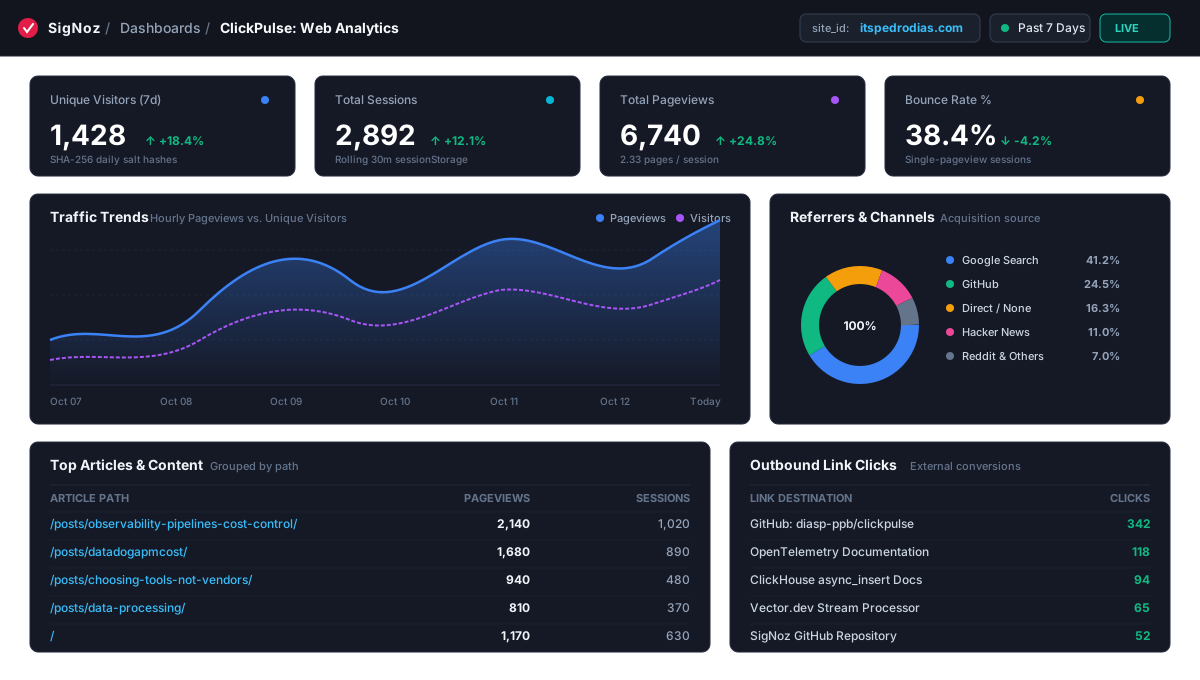 Figure 1: ClickPulse dashboard in SigNoz showing live KPIs, traffic trends, channels, and top posts.
SigNoz recently adopted declarative schema v6 for dashboards (available in the repo as web-analytics-dashboard.json). Under this schema, panels can query ClickHouse directly by wrapping raw SQL inside a CompositeQuery envelope using queryType: "clickhouse_sql".
For time series and KPI widgets to render properly, queries must provide explicit value (Float64) and ts (DateTime) columns. In addition, dashboard variable filters use the syntax WHERE site_id IN $site_id, which accommodates both single values and multi-select tuple arrays like ('itspedrodias.com', 'blog.example.com').
1. Key Performance Indicators
- Unique Visitors:
uniq(visitor_id)across pageviews. - Sessions:
uniq(session_id)for distinct user visits. - Pageviews: Total
count()of page loads. - Bounce Rate %: Calculated in a single pass with partition pruning:(Note: Single-value KPI cards use
SELECT ifNull(round(countIf(hits = 1) * 100.0 / nullIf(count(), 0), 1), 0) AS value, now() AS ts FROM ( SELECT session_id, count() AS hits FROM clickpulse.analytics_events WHERE site_id IN $site_id AND event_type = 'pageview' AND created_at >= now() - INTERVAL 7 DAY GROUP BY session_id );now() AS tsas a synthetic timestamp to satisfy SigNoz’s panel query contract. For continuous graphs, queries group by time buckets such astoStartOfHour(created_at) AS ts. Bounding the inner subquery bycreated_at >= now() - INTERVAL 7 DAYensures ClickHouse prunes historical partitions rather than scanning months of data.)
2. Traffic Trends and Channels
- Time Series: Hourly pageviews vs unique visitors over 7 or 30 days.
- Channels and Referrers: CASE and ILIKE pattern matching classifying traffic into Google, GitHub, Reddit, Hacker News, X/Twitter, and direct visits:
SELECT
  CASE
    WHEN referrer = '' OR referrer IS NULL THEN 'Direct / None'
    WHEN referrer ILIKE '%google%' THEN 'Google Search'
    WHEN referrer ILIKE '%github%' THEN 'GitHub'
    WHEN referrer ILIKE '%reddit%' THEN 'Reddit'
    WHEN referrer ILIKE '%ycombinator%' THEN 'Hacker News'
    WHEN referrer ILIKE '%twitter%' OR referrer ILIKE '%t.co%' OR referrer ILIKE '%x.com%' THEN 'X / Twitter'
    WHEN referrer ILIKE '%linkedin%' THEN 'LinkedIn'
    ELSE ifNull(domainWithoutWWW(referrer), referrer)
  END AS channel,
  toFloat64(uniq(session_id)) AS value
FROM clickpulse.analytics_events
WHERE site_id IN $site_id AND event_type = 'pageview'
  AND created_at >= now() - INTERVAL 30 DAY
GROUP BY channel ORDER BY value DESC LIMIT 10;
3. Content Performance and Conversions
- Top Articles: Ranks
/posts/...paths by pageviews and session counts. - Outbound Link Clicks: Captures clicks on external links (like GitHub repositories or external documentation), extracting the target URL and link text from the
event_dataJSON string. - Hardware and Countries: Basic device breakdown (Desktop, Mobile, Tablet) and top visitor countries.
Adding It to Any Site
Because the database indexes on site_id, a single deployed worker and ClickHouse table can monitor multiple sites simultaneously.
On any blog, documentation site, or app:
<script defer
  src="https://diasp-ppb.github.io/clickpulse/tracker.min.js"
  data-site="itspedrodias.com"
  data-endpoint="https://analytics.itspedrodias.com/api/analytics">
</script>
The production tracker (tracker.min.js) is 2.1 KB raw (2,175 bytes), 1.18 KB gzipped, and 1.00 KB under Brotli compression (quality level 11, pre-compressed and served by Fastly on GitHub Pages). It loads asynchronously from GitHub Pages CDN, attaches click listeners for outbound links, and uses navigator.sendBeacon to transmit telemetry without delaying page unloads.
Honest Trade-offs and Gaps
Every engineering decision involves trade-offs. Here are the clear limitations of this architecture:
1. No Multi-Day Retention Cohorts
Because the date partition in the hash input changes every 24 hours at 00:00 UTC, past visitor hashes cannot be linked to new visits. As a result, you cannot tell if a user from Monday returned on Friday.
If you run an application where you need 30-day user retention curves, multi-week onboarding funnels, or persistent user profiles, ClickPulse cannot do that by design. That is the necessary compromise for staying completely cookieless and avoiding PII storage.
2. Bot Traffic and Headless Crawlers
The edge worker enforces basic sanity checks: POST-only requests, maximum payload size (4 KB), allowed Origin domains, and common User-Agent bot patterns.
However, modern AI crawlers and headless scrapers can spoof headers and execute JavaScript. Furthermore, HTTP Origin headers are not an authentication mechanism; non-browser HTTP clients can forge them easily. Filtering out malicious scraping and high-rate event injection requires Cloudflare WAF rate-limiting rules, Bot Fight Mode, or Turnstile upstream.
3. Not a Replacement for OpenTelemetry RUM
Engineers often ask why they should not just use @opentelemetry/sdk-trace-web.
They solve two fundamentally different problems:
| Dimension | OpenTelemetry RUM (sdk-trace-web) | ClickPulse (Web Analytics) |
|---|---|---|
| Target Audience | SREs, Performance Engineers | Authors, Founders, Growth Engineers |
| Core Question | Why did /api/checkout take 450ms? What is the p99 LCP on Safari? | Where are visitors coming from? Which post is popular? What is the bounce rate? |
| Data Format | Distributed Traces, Spans, Network Waterfalls | High-level Events (pageview, outbound_click) |
| Bundle Size | 30 KB to 150 KB+ gzipped | 1.18 KB gzipped (1.00 KB Brotli q11, 2.1 KB raw) |
| Cost Profile | Millions of spans in hot APM storage | Flat columnar rows in ClickHouse compressed on disk |
Use OpenTelemetry RUM inside authenticated, complex web applications for performance debugging. Use ClickPulse on public marketing sites, personal blogs, and documentation for lightweight, privacy-friendly traffic stats.
4. Mobile Cellular IP Flapping
When mobile readers travel between cell towers, their mobile carrier may reassign their public IP address mid-session.
While sessionStorage keeps their session_id stable throughout the visit, the daily visitor_id relies partly on client IP. In rare handover cases, one mobile visitor may register as a second unique visitor for that day.
5. D1 Spool Ingestion: Ordering, Idempotency, and Backpressure
When the homelab is offline, the worker redirects events to Cloudflare D1. Draining that spool raises three practical considerations:
- Ordering: Events spooled to D1 during downtime are inserted in bulk once connectivity returns. ClickHouse sorts parts by
(site_id, event_type, toDate(created_at), session_id, created_at)during background merges, so late-arriving events are correctly integrated into historical time-series queries without distorting timestamps. - Idempotency and Failure Modes: Two edge scenarios can occur during network instability:
- Network timeout with committed write: The worker HTTP POST times out at the edge, but ClickHouse received and queued the row. The worker catches the network error and spools to D1. When
sync-clilater drains D1, ClickHouse receives a duplicate record. Importantly,uniq(visitor_id)anduniq(session_id)in ClickHouse use an adaptive HyperLogLog algorithm with an approximate error rate of ~1.5%, making unique visitor and session metrics inherently immune to duplicate records. (If exact mathematical counts are required, useuniqExact()). Only the rawcount()of total pageviews would register a +1 count on a retry duplicate. If strict deduplication of raw events is desired, the table engine can be converted toReplacingMergeTree, though queries will requireSELECT ... FROM analytics_events FINALto enforce query-time deduplication across unmerged parts. - Buffer loss without worker knowledge: Because
wait_for_async_insert=0returns an HTTP 200 once data enters ClickHouse RAM, an unhandled crash or disk-full state on the database before the memory buffer flushes will drop those rows without the worker ever knowing to trigger D1.
- Network timeout with committed write: The worker HTTP POST times out at the edge, but ClickHouse received and queued the row. The worker catches the network error and spools to D1. When
- Backpressure and Spool Failure: The D1 free tier accommodates 100,000 writes per day. If a homelab outage extends past 24 hours on a high-traffic site, write limits will require either upgrading to a paid D1 plan or shedding events at the worker edge. If a D1 write itself fails (for example, if database storage quotas are exceeded), the worker logs the exception and returns an HTTP 500 so the client beacon is notified rather than falsely assuming persistence.
Open Source Repository
The code is available under the MIT license on GitHub:
github.com/diasp-ppb/clickpulse
The repository includes:
packages/tracker: The TypeScript client SDK and minified bundle.packages/edge-worker: The Cloudflare Worker edge ingestion gateway with CORS handling and D1 spooling.packages/sync-cli: The Python ETL tool to drain Cloudflare D1 spooled records into ClickHouse after outages.schema.sql: ClickHouse table schemas, codecs, and sandboxed user permissions.dashboards/signoz: The native SigNoz schema v6 dashboard template.dashboards/grafana: The Grafana ClickHouse datasource dashboard definition.
If you already operate ClickHouse for logs or traces, repurposing that same infrastructure for pageviews is a practical way to keep your telemetry consolidated in one place.